Wanderreel Coming soon

For Android · Coming soon to Google Play

Saved a reel? Keep the places.

Share a travel reel from Instagram, TikTok or YouTube. Wanderreel reads it, finds every place in it, checks each one on Google Maps and shows you the exact words that pointed to it. Then it plans your days.

  • Instagram
  • TikTok
  • YouTube
  • Screenshots
  • Screen recordings
A place in Wanderreel: Ichiran Shibuya in Tokyo, with its photo and the reason it was saved.
The Wanderreel Inbox: a card for a place found in a reel, with Keep and Skip buttons.

How it works

From scrolling to a list you can travel with

No copying names into Maps, no screenshots you never look at again.

  1. Share the reel

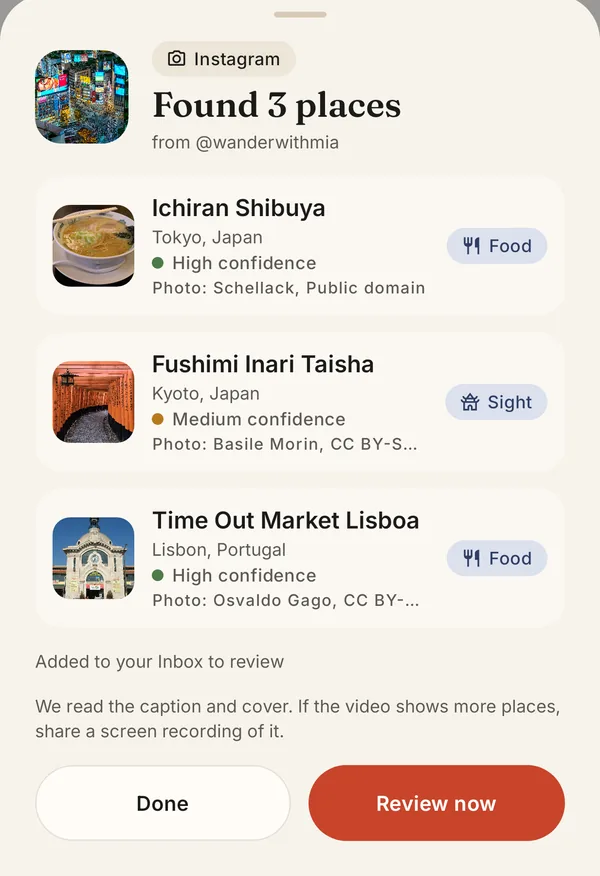
    In Instagram, TikTok or YouTube, tap Share and choose Wanderreel. Places that only show up in the video? Share a screenshot or a screen recording instead.

    The share sheet: Wanderreel found three places in a shared Instagram reel.
  2. Every place, checked

    Wanderreel reads the caption, the pictures and even the video, then checks each place on Google Maps. Why this place? shows the words that pointed to it.

    The place page for Shinjuku, with the card Why this place? explaining what the place is and where it was read.
  3. Swipe to keep

    Keep or skip, one card at a time. What you keep goes into a trip for its country, ready to plan.

    A place card in the Inbox, ready to keep or skip.

Why this place?

It shows its work

Every place comes with its proof: the line from the caption, the words on screen or the location tag it was read from, and whether Google Maps knows it. You decide with the evidence in front of you.

  • Verified on Google Maps with its pin, address, rating and photo.
  • The post's own tips kept: the day it belongs to, how long to stay, what it costs.
  • Wrong match? Fix the name or find it on the map yourself.
Why this place?

Fushimi Inari Taisha

Kyoto, Japan · Sight

“Get there at 5am at the thousand gates, before the crowds.”

Read from the words on screen in the reel

✓ Verified on Google Maps Day 2 in the post

Trips and plans

Your days, planned

Kept places gather into a trip for each country. Say how many days you have and Wanderreel plans them, grouping places that sit close together.

  • Day by day, with start times, how long to stay and how to get to the next stop.
  • A map for every day, numbered stops in order, and one tap to open the day in Google Maps.
  • Ideas for thin days: real places near the ones you saved, checked on Google Maps.
  • Yours to change: drag stops, move them between days, add notes and dates.
The Trips tab: one card per country with its photo and number of places.
A trip to Japan planned by day, with numbered stops, start times and a map of the day's route.

Together, and everywhere

Plan together, on any screen

Wanderreel works without an account. Sign in with Google when you want your trips on more than one device, or someone to plan with.

Invite a partner

Send an invite to edit the trip with you, or one to just look. You'll see who added what.

Optional account

Trips you put in your account follow you to a new phone or tablet. Delete the account any time, in the app.

Phones, tablets, Googlebooks

On a big screen your trips and a plan sit side by side, with keyboard shortcuts, right-click menus and drag and drop.

Wanderreel on a wide screen: the list of trips on the left, a trip's day-by-day plan on the right.

Quiet by design

No ads. No tracking.

Your places and trips live on your phone. What you share is read on our server only to find the places in it. There are no ads, no analytics and no tracking, and your data is never sold.

Read the privacy policy

Stays on your phone

No account needed. Without one, nothing about your trips leaves the device.

This site is quiet too

No cookies, no analytics, no third-party scripts or fonts on this page.

Your next trip is already in your saved reels

Wanderreel is coming soon to Google Play, for Android phones, tablets and Googlebooks.